

Getting found locally Practical guide
Weekly plan for plumbers, electricians, roofers
Track every enquiry in one worksheet and separate accepted work from work you will not quote. Then run the same weekly routine: check your Google Business Profile, ask for genuine reviews, and keep any Checkatrade profile accurate and current. Split repair, survey and installation capacity by trade so you only market work you can actually take on.
Take this with you
At a glance
- Track every enquiry in one place using the same five stages each week: New enquiry, Accepted, Quote due, Quote sent and Won.
- Update Google service areas, hours, categories, services, reviews and photos weekly using accurate trade details only.
- Set separate capacity for repair, survey and installation work so you do not market work you cannot quote or fit in.
Busy trades firms do not usually need more enquiries in general. They need more of the right enquiries, in the right areas, at the right time.
If you searched for how to get more plumbing customers, start by deciding what type of plumbing work you actually want next week. The same applies to electricians and roofers. A good local profile can help you get found, but it does not fix poor tracking or a diary that is already overcommitted.
This guide uses one shared plan for plumbers, electricians and roofers, then shows where each trade should split repair work from planned jobs. If you want help with the setup itself, see our local SEO service.
Start with what “more customers” means this week
Before you update anything online, write down your real capacity for the next seven days.
For most small trade firms, that means four decisions:
- how many urgent jobs you can take
- how many quote visits you can do
- how many planned jobs you can start
- which towns or postcodes you can cover without wrecking the diary
That matters because Google says local results are mainly based on relevance, distance and prominence, and there is no way to request or pay for better local ranking (Google Business Profile ranking tips). Better visibility only helps if the enquiries match what you can actually take on.
For service-area trades, set your working patch realistically. Google says you can add up to 20 service areas, define them by places such as towns or postcodes rather than a radius, and keep the overall area to about two hours’ drive from base (Google service areas).
Use one enquiry worksheet every week
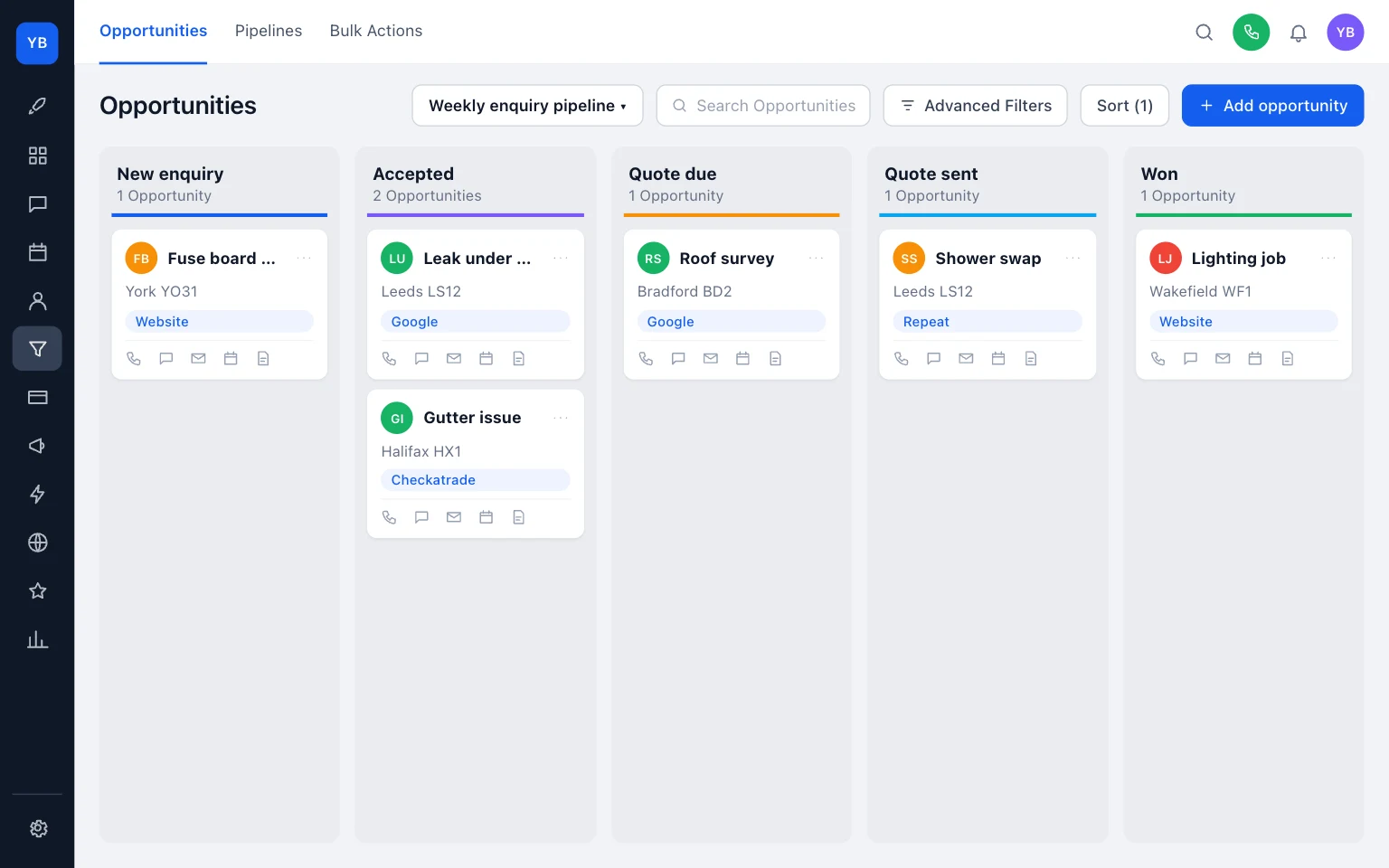
Use the same five stages every week:
- New enquiry
- Accepted
- Quote due
- Quote sent
- Won
That is enough detail to spot where work is leaking out.
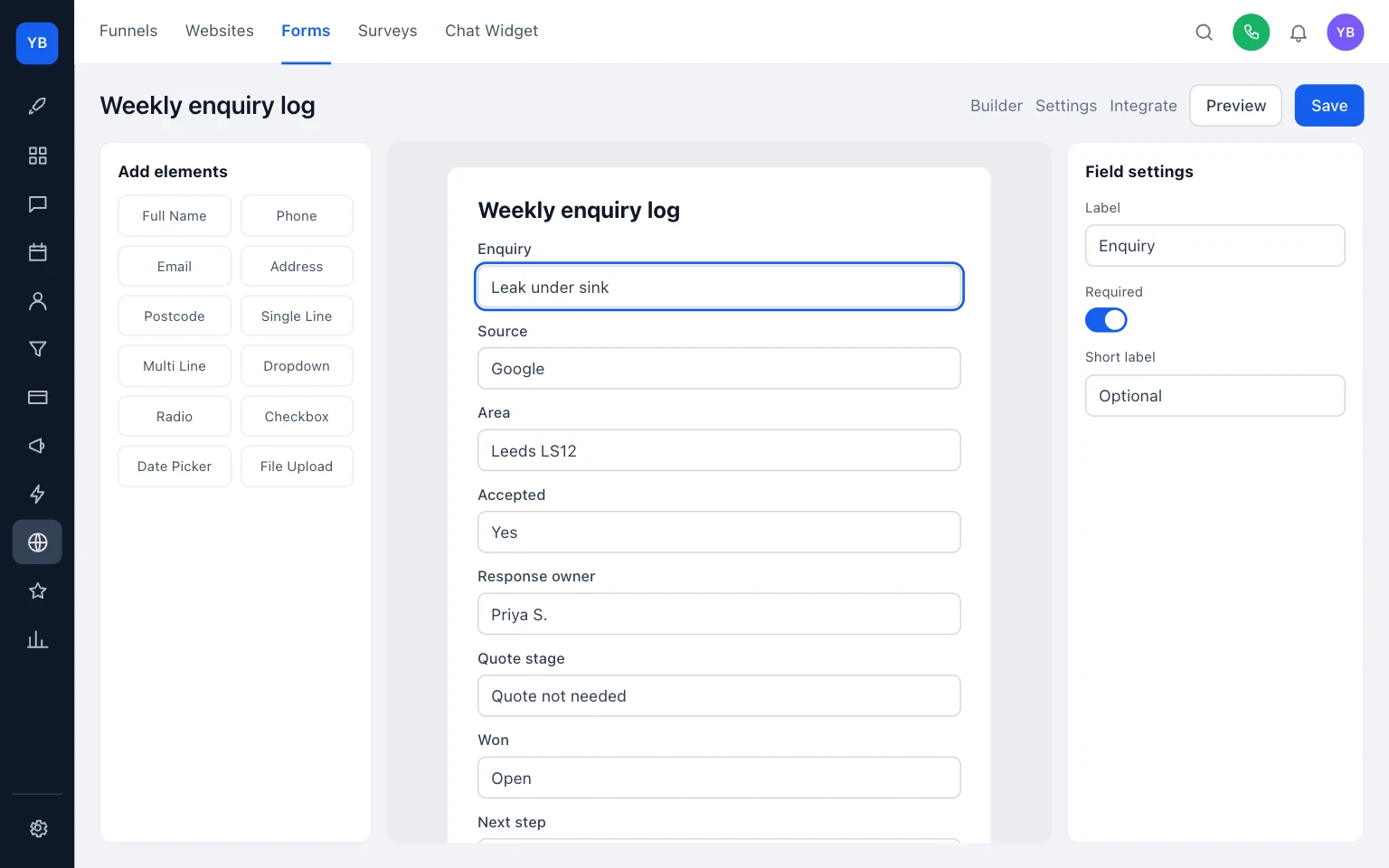
Here is a simple worksheet you can copy into your CRM, spreadsheet or notebook.
Scroll sideways to see all columns.
| Enquiry | Source | Area | Accepted | Response owner | Quote stage | Won | Next step |
|---|---|---|---|---|---|---|---|
| Leak under sink | Leeds LS12 | Yes | Priya S. | Quote not needed | Open | Call before 11:00 | |
| Consumer unit enquiry | Website | York YO31 | No | Dan R. | Not quoting | No | Refer out |
| Roof leak check | Checkatrade | Halifax HX1 | Yes | Alex T. | Quote due | Open | Book survey slot |
| Shower replacement | Repeat customer | Bradford BD2 | Yes | Priya S. | Quote sent | Open | Chase on Thursday |
A few rules make this useful:
- If you do not know the source, ask on the first call.
- If the job is outside area or outside scope, mark it as not accepted.
- Give one person clear ownership of the next reply.
- Update won status only when the customer agrees the work.
If your current process is scattered across missed calls, texts and scraps of paper, tidy that first. Our guides on Google Maps visibility, job photo organisation and return-call number checks will help, and you can browse more at /guides/.
Run the same weekly plan every Friday
Keep the routine short enough that it actually happens.
1) Check Google Business Profile
Make sure the profile is still verified, your business information is complete and accurate, reviews are answered, and fresh photos or videos of real work are being added (Google Business Profile ranking tips).
Keep categories tight. Google says to use one primary category and only a few additional ones, not a category for every service. Specific jobs belong in the services section instead, and Google says those services may be highlighted when local customers search (Google categories and services).
2) Ask for and reply to genuine reviews
Google says reviews should reflect real customer experiences, and incentives or discounts for reviews are not allowed. It also recommends clear, polite, relevant replies (Google review guidance).
3) Check your Checkatrade profile if you use it
Checkatrade says members can add photos, reviews, a company description, services, and accreditations or qualifications to their profile; choose postcode work areas; and may receive customer contact by direct call, quote request, or profile booking where applicable, as published on 2026-11-16 (Checkatrade pricing).
Checkatrade listed Free at £0/month, Approved at £30/month, and Growth from £59/mo, as published on 2026-11-16; VAT treatment was not confirmed on the page reviewed (Checkatrade pricing). The same page said Growth includes search placement benefits with £100-£200 credit and Checkatrade Pay fees from 1.29%-1.79%, as published on 2026-11-16; wider terms were not confirmed from the page reviewed (Checkatrade pricing).
UKTL has a commercial interest here because we sell managed setup and improvement work. For fairness:
- DIY Google profile upkeep suits sole traders and small firms who will do the admin every week.
- Checkatrade membership suits firms that want a trade-directory profile and will judge it by accepted enquiries, quotes and won jobs.
- A managed option from UKTL suits firms that want help keeping profiles, service pages and tracking aligned. You can compare that with our pricing.
Plumbers: separate urgent repairs from planned installs
Plumbing enquiries often mix urgent faults with planned work. If you treat all of it as one queue, fast repair work gets buried and larger jobs get slow replies.
Split your weekly capacity first:
- urgent repairs you can attend quickly
- small planned jobs you can quote remotely or on one visit
- larger installation work that needs surveying and scheduling
On Google, keep the category choice simple and use the services section for the specific plumbing jobs you really do (Google categories and services). On your own site, make those same service splits obvious. Our websites for plumbers page shows the sort of structure that helps customers choose the right route.
Example
Before, four enquiries sat together as “plumbing”:
- leak under kitchen sink
- shower replacement
- outside tap
- bathroom refit
After sorting by actual capacity for this week:
- Accepted now: leak under kitchen sink, outside tap
- Quote this week: shower replacement
- Deferred to later start date: bathroom refit
That one change makes the diary easier to protect and the response owner clearer.

Electricians: list only work and credentials you hold
Electrical buyers look for accuracy. If your profile suggests work you do not cover, or shows accreditations that are out of date or not actually held, you create friction before the first call.
The safe rule is simple:
- list only genuine services you offer
- list only genuine accreditations or qualifications actually held
- keep the wording consistent across Google, Checkatrade and your website
Checkatrade says profiles can include accreditations and qualifications, as published on 2026-11-16, so use that space carefully and keep it current (Checkatrade pricing). Do not try to solve every search term with more categories. Google advises keeping categories limited and using services for the specific jobs instead (Google categories and services).
Operationally, separate fault-finding and urgent call-out work from planned installation or testing work in your worksheet. If one person is on the tools and another answers incoming messages, put one named response owner against each accepted enquiry. That stops crossed replies and forgotten quotes.
If you need the website side cleaned up as well, see websites for electricians.
Roofers: split repair enquiries from survey-led work
Roofing enquiries often mix small repair jobs with larger work that needs a survey and a proper quotation. If you keep them in one undifferentiated queue, either repairs wait too long or larger jobs never get proper time booked for them.
Keep two separate capacity lines in your worksheet:
- repair work you can inspect and patch quickly
- survey and quotation time for larger roofing work
Keep your service areas honest. If you can only reach nearby jobs quickly this week, tighten the area you are promoting rather than pretending you cover everything. Google’s service-area rules still apply: places or postcodes, not radius, and a sensible travel footprint (Google service areas).
For profile wording, use plain service labels for genuine jobs rather than stuffing categories. That is closer to how Google says categories and services should be used (Google categories and services).
Example
Your worksheet shows three new roofing enquiries on Tuesday:
- leaking flat roof in a near postcode
- slipped tiles in a near postcode
- full replacement enquiry in a further town
If this week’s repair capacity is already tight, you can still accept the two nearby repair enquiries and place the full replacement enquiry into a later survey slot with a clear next action. That is better than giving all three the same vague reply.
For the site structure side, see websites for roofers.
Decide what to fix today
If you want a practical start today, do these in order:
- Create the five stages: New enquiry, Accepted, Quote due, Quote sent, Won.
- Log the last ten enquiries and add the source for each one.
- Check your Google service areas, hours, categories and services.
- Ask one recent genuine customer for a review and reply to any waiting reviews.
- Add three recent work photos to Google or, if you use it, update your Checkatrade profile with current services or profile content.
- Tighten the area you are promoting if next week’s capacity is already full.
If you want the weekly setup done properly and tied to your site, profiles and enquiry handling, see our local SEO service. If you are comparing doing it yourself versus getting help, use our pricing page as the starting point, then judge every route by accepted enquiries, quotes and won jobs rather than by impressions alone.
Keep building your enquiry process
See our guides for trades for the wider picture, explore getting found locally with UKTL and check the current package and pricing.
- How to get your trades business found on Google Maps
- Check the number customers see on return calls
- How to organise job photos for web and social
For a practical next step, read Best CRM for UK tradesmen: costs and setup support.
Make it practical
Talk through your own setup.
If the website, local search and follow-up all need joining up, we can walk through how the UKTL setup works for your business.
Book a quick call