

All-in-one inbox Practical guide
Shared inbox handovers without crossed replies
When a customer conversation moves from the owner to an office helper, use one clear owner, then post a short internal handover note in the existing thread. Include the latest customer request, what was promised, who is taking over, and the next action with a due time. Have the receiving person confirm inside the thread before they send any customer reply.
Take this with you
At a glance
- Assign one owner to the conversation, then add an internal comment with an @mention so the handover is visible in the same thread.
- Use a five-line handover note that states the latest request, any promise already made, the new owner, and one next action due.
- Make the receiver confirm in an internal comment before replying to the customer, then check they can find the thread in My Inbox or with a Mention filter.
A shared inbox only helps if one person knows who is replying next.
That is the real handover problem for a small trades team. A customer has already written in. The thread already exists. One person has answered, promised something, then needs another person to pick it up without sending a conflicting reply or missing the promise.
In HighLevel, the clearest supported way to do that inside the existing conversation is to use an internal comment with an @mention. HighLevel says internal comments stay private inside the conversation, are not shown to the contact, and mentioned teammates can be notified. The same help page also says internal comments cannot be edited or deleted after posting, so the note needs to be short and deliberate (Internal comments and mentions).
This article is about that internal handover between two people already dealing with a live customer thread. It is not about missed-call handling. If your inbox setup is still too loose for that to work well, start with /services/customer-inbox/ and then review the wider resources in /guides/.
Use one owner, not two active repliers
The simplest way to stop crossed replies is to give the conversation one owner at a time.
That does not mean only one person can ever see it. It means one person is responsible for the next customer-facing reply. Everyone else stays in support mode until that person has confirmed they are taking it.
This fits how HighLevel structures inbox visibility. My Inbox shows conversations assigned to you or followed by you, while Team Inbox shows all conversations for users with full access. HighLevel also provides filters for Assigned, Follower, Mention and Last Message Direction, with AND and OR logic available (Getting started with Conversations).
For a handover between an owner and an office helper, the practical pattern is:
- assign the conversation to the person who will send the next customer reply
- add an internal comment that names the handover clearly
- @mention the receiving person in that comment
- ask the receiver to confirm inside the thread before replying
That is more reliable than a separate chat message, a sticky note, or trying to remember who last spoke to the customer.
The five-line internal handover note
Because internal comments cannot be edited or deleted after posting, keep the note brief and factual (Internal comments and mentions).
Use this five-line draft and adapt it to each conversation:
Scroll sideways to see all columns.
| Line | What to write |
|---|---|
| 1 | Latest customer request: |
| 2 | What we already promised: |
| 3 | Handover from [owner] to [receiver]: |
| 4 | Next action due by [date/time]: |
| 5 | Internal only: receiver please confirm here before replying |
That structure does four useful things.
First, it copies the customer’s latest request into the note, so the receiver does not have to scan the whole thread and guess which message matters most.
Second, it records any promise already made. In trades work, the usual risks are timing, stock checks, photos, site visits, and call-backs. If the first person said you would confirm by a certain time, that belongs in the handover note.
Third, it names the handover plainly. Do not imply it. Write Sam to Jade, or Owner to Office. That makes the change visible to anyone else who opens the thread.
Fourth, it gives one next action with one due time. Not three options. Not a vague today if you actually mean before lunch.
Acknowledgement checklist before anyone replies
Use this checklist every time the conversation moves between people:
- Receiver is assigned, or at minimum mentioned and following the thread.
- Latest customer request is copied into the internal comment.
- Any promise already made is written plainly.
- One next action and one due time are named.
- Receiver adds a confirmation internal comment before sending any customer reply.
That last step matters. It turns the handover from an assumption into a visible acceptance.
HighLevel’s help pages support the pieces behind this method. Mentioned users can be added as followers, which can help them view and reply to the conversation, and separate notification settings exist for assignment, new messages on assigned conversations, and mentions (Workflow action: Add Internal Comment, Live chat notifications).
A simple confirmation comment is enough:
Seen. I am taking this one. I will confirm stock and reply by 3:30pm.
That tells the whole team not to jump in.
Example
Customer message:
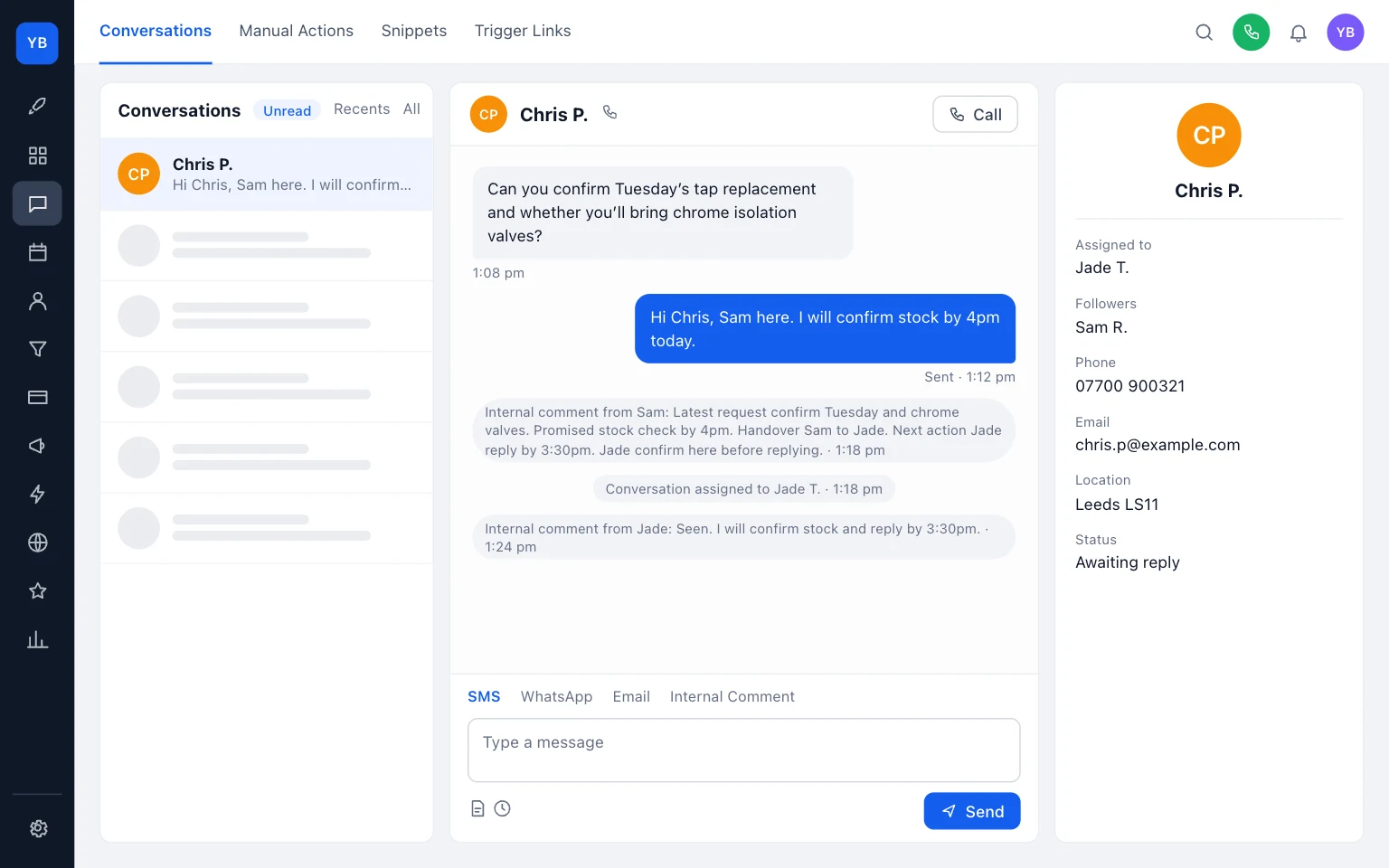
Can you confirm Tuesday’s tap replacement and whether you’ll bring chrome isolation valves?
Internal handover note:
- Latest request: confirm Tuesday visit and chrome valves.
- Promised: Sam said we would confirm stock by 4pm today.
- Handover: Sam to Jade.
- Next action due: Jade to confirm stock and reply by 3:30pm.
- Internal only: Jade please confirm here before replying.
What happens next:
- Sam assigns the conversation to Jade.
- Sam posts the internal comment and @mentions Jade.
- Jade opens the thread and adds a confirmation internal comment.
- Only after that does Jade reply to the customer.
Why this works:
- the customer’s latest request is written out plainly
- the earlier promise is preserved
- the next owner is obvious
- everyone else can see that the thread is already being handled
What not to do:
- do not leave the note in a separate chat tool
- do not hand over with only a verbal message
- do not let both people reply while the assignment is unclear
- do not write a long internal essay that hides the one next action
How the receiving person finds the thread
Once assigned, the receiving person should usually find the conversation in My Inbox. If they were mentioned, HighLevel also supports mention-based filtering, including finding conversations where a specific user was mentioned (Getting started with Conversations).
That gives you a practical check after every handover:
- Ask the receiver to open My Inbox.
- If it is not obvious there, check the thread assignment.
- If needed, use the Mention filter to find the conversation.
- Get the receiver to post their confirmation internal comment.
There is one limitation worth knowing. HighLevel’s conversation filters are session-based, so they need to be reapplied when you return later. That means you should not rely on a permanent saved handover queue unless you have tested a separate setup for your team (Conversation filters overview).
So the dependable method is still the same: assign the receiver, mention them in the internal comment, and have them confirm in the thread.
A simple routine you can start today
If you want to put this in place today, do it with one live process, not a big rewrite.
Start with these rules:
- one conversation owner at a time
- every handover stays inside the existing customer thread
- every handover uses the same five lines
- the receiving person confirms before replying
Then test it on one type of enquiry first. Good starting points are stock checks, booking confirmations, quote follow-ups, or access questions before a visit.
A small team can run this routine:
- Owner reads the latest customer message.
- Owner assigns the thread to the receiver.
- Owner posts the five-line internal note and @mentions the receiver.
- Receiver finds the thread in My Inbox or with a Mention filter.
- Receiver confirms in an internal comment.
- Receiver sends the customer reply.
If that sounds basic, good. Basic is what works in a busy office or van between jobs.
HighLevel’s help pages do not appear to provide a single dedicated article for manual person-to-person handover inside an existing thread. This method is built from the documented behaviour of internal comments, mentions, assignment, followers, inbox views, filters and notifications. That makes it practical, but it also means your team should test it once in your own sub-account before relying on it every day.
If you also need clearer ownership between enquiry, visit, quote and booked work, read The job pipeline stages a small trades team needs. If email changes are causing confusion around who receives replies, use Business email change checklist for trades. If your web enquiries arrive vague and hard to hand over, tighten the source with What to include on a trades service page.
And if you want help setting this up properly inside the CRM UKTL clients use, see /services/customer-inbox/ and /pricing/.
The main point is simple: do not hand over a customer conversation by memory. Hand it over inside the thread, with one owner, one note, and one confirmed next action.

Keep building your enquiry process
See our guides for trades for the wider picture, explore all-in-one inbox with UKTL and check the current package and pricing.
Make it practical
Talk through your own setup.
If the website, local search and follow-up all need joining up, we can walk through how the UKTL setup works for your business.
Book a quick call Explore the relevant service →