

Job management pipeline Practical guide
The job pipeline stages a small trades team needs
Most small trades firms do not need a complicated board. They need a short set of job pipeline stages for trades that match real decisions: enquiry, visit, quote, agreed work and completion. The key is to define what lets a job enter each stage, who owns it, and what must happen next.
Take this with you
At a glance
- Write one clear entry condition and one exit condition for every stage on your board.
- Keep “quote sent”, “agreed work” and payment separate unless you have deliberately set up rules to connect them.
- Test your stage definitions by walking one real recent job through them before changing your live pipeline.
Small trades teams usually do not need more software. They need fewer grey areas.
If your board has columns such as “new”, “active” and “done”, people start guessing. One person moves a job when the customer asks for a quote. Another moves it when the quote is emailed. Someone else treats “won” as booked in, even though no date is set. That is how jobs go missing.
A better answer is a short pipeline with stage definitions your team can observe. If a job enters a stage, there should be evidence. If it sits in a stage, there should be one owner and one next action.
That is the real point of a pipeline. In HighLevel terms, the pipeline is the overall process, the stage is one step, the opportunity is the individual deal, and the contact is the person linked to it. Its setup guidance also says stages should reflect your actual sales process, not a generic template (Getting Started - Setup Pipelines and Opportunities).
If you want help building or tidying this properly, see our job pipeline service. For wider operational guides, start at /guides/.
Start with the minimum stages
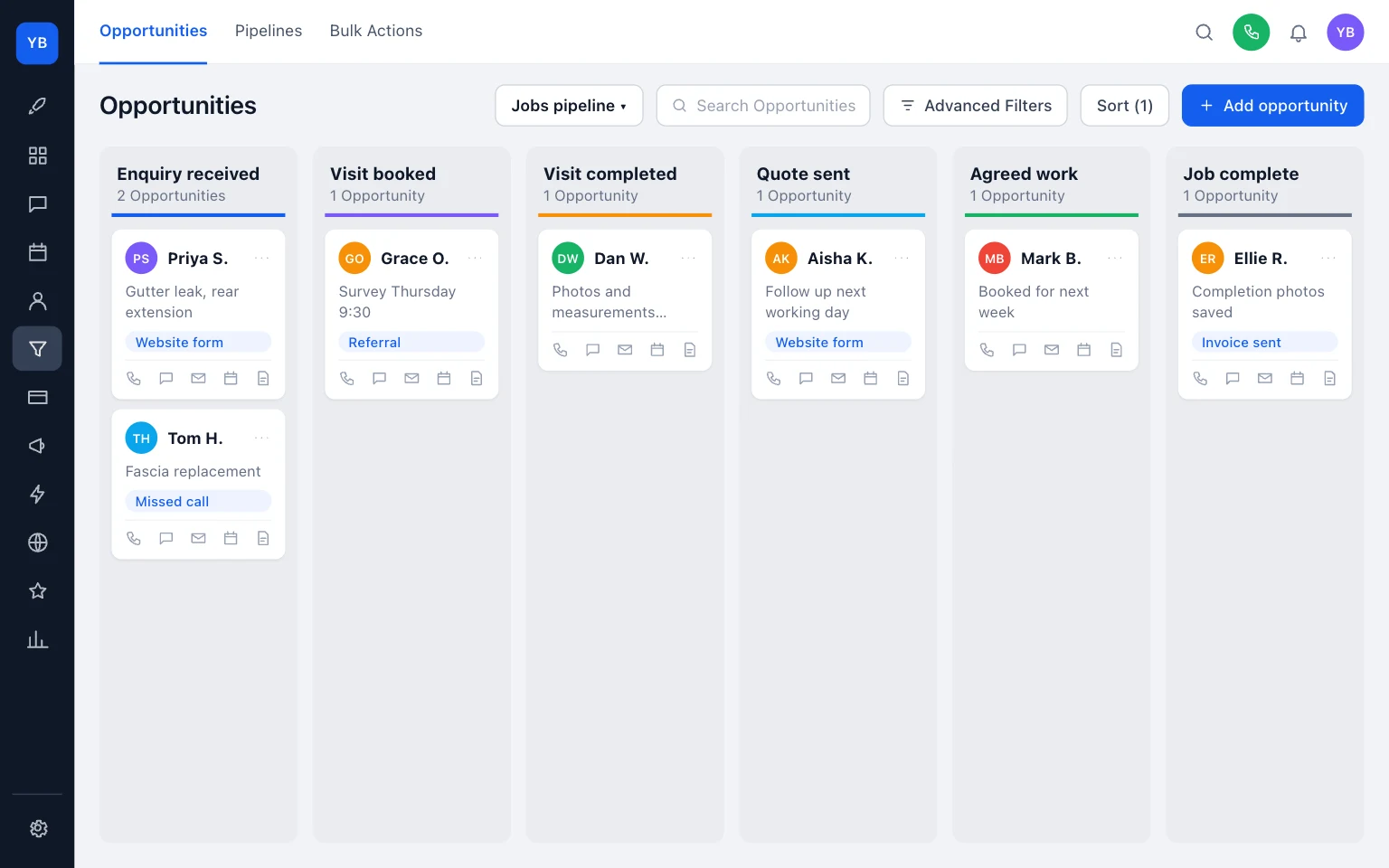
For most small trades firms, a useful starter pipeline is:
- Enquiry received
- Visit booked
- Visit completed
- Quote sent
- Agreed work
- Job complete
That is enough to answer the questions a busy team actually asks:
- Have we got enough information to respond?
- Is a visit booked?
- Has the visit happened?
- Has the quote gone out?
- Has the customer agreed the work?
- Is the job finished?
You do not need stages for every tiny admin action. “Left voicemail” is not a stage. “Waiting” is not a stage. “Active” is not a stage. HighLevel’s own pipeline guidance says stages should be clearly defined and action-oriented (Understanding Pipelines).
What makes a stage usable
A stage becomes usable when four things are clear:
- what evidence lets a job enter it
- who owns it
- what the next action is
- what must happen before it leaves
This matters more than the stage name.
For example, “Quote sent” is only useful if your team agrees what that means. Is it drafted? Is it saved? Is it emailed? Is it linked to the job? If people mean different things, the board will lie.
The same goes for visits. A job should not sit in “Visit” just because someone thinks a survey is needed. A booked appointment is an observable event. HighLevel supports creating appointments from opportunities, which backs up treating the visit as its own step rather than a vague note on the side (Manually Booking Calendar Appointments).
A starter pipeline table for a small trades team
Use this as a draft and change the wording to match how your team really works.
Scroll sideways to see all columns.
| Stage | Entry condition | Owner | Next action | Exit condition |
|---|---|---|---|---|
| Enquiry received | Name, contact method, job summary and service area are recorded on the job | Office or first responder | Triage the enquiry: ask missing questions, decline, or book visit | Visit booked, remote quote route confirmed, or unsuitable enquiry closed |
| Visit booked | A date and time for a site visit or survey is in the calendar and linked to the job | Surveyor, estimator or assigned operative | Attend visit and record scope, measurements, photos and access notes | Visit completed, or visit cancelled and rebooked/closed |
| Visit completed | The visit happened and the information needed to price the work is on the job | Estimator or office | Prepare and send quote | Quote has been sent to the customer |
| Quote sent | Quote or estimate has been issued to the customer and logged against the job | Estimator or office | Follow up on the date agreed | Customer declines, asks for revision, or accepts the work |
| Agreed work | Customer has accepted the quote and the work is booked or clearly ready to schedule | Office or operations lead | Confirm dates, materials, access and prep | Job is finished on site |
| Job complete | Work is finished and completion notes or photos are saved on the job | Operative or office | Send completion message and invoice if needed | Job record is complete and ready for payment follow-up/reporting |
Two details are worth protecting from day one.
First, every live stage needs an owner. In HighLevel, tasks can be created against an opportunity with a title, description, assignee and due date/time, which is a good operational cue to keep one clear next action attached to each live job (Unified Task Management Across Contacts and Opportunities).
Second, “quote sent” must not automatically become “agreed work”. The quote has gone out, but the customer has not yet accepted it.
Keep quote, booking and payment separate
This is the mistake that causes the most confusion.
A quote sent is evidence of a sales step. It is not evidence of a booking. It is not evidence of a deposit. It is not evidence that the job is complete.
HighLevel keeps estimates and invoices linkable to an opportunity, and it distinguishes between manual linking and automatic association (Link Opportunities with Invoices & Estimates). That separation is useful governance for a trades team:
- quote sent = the customer has been given a price
- agreed work = the customer has accepted and the job can be scheduled
- payment = money handling, which may happen before, during or after the work
Do not blur those together just because the software can be automated later.
If you want cleaner enquiries before jobs even hit your pipeline, review what to include on a trades service page. If your visit stage keeps overrunning, tighten the time blocks using how long to block for a quoting site visit. If payment links are part of your completion process, check them with how to test an invoice payment link properly.
Examples
Here is one job walked through the table.
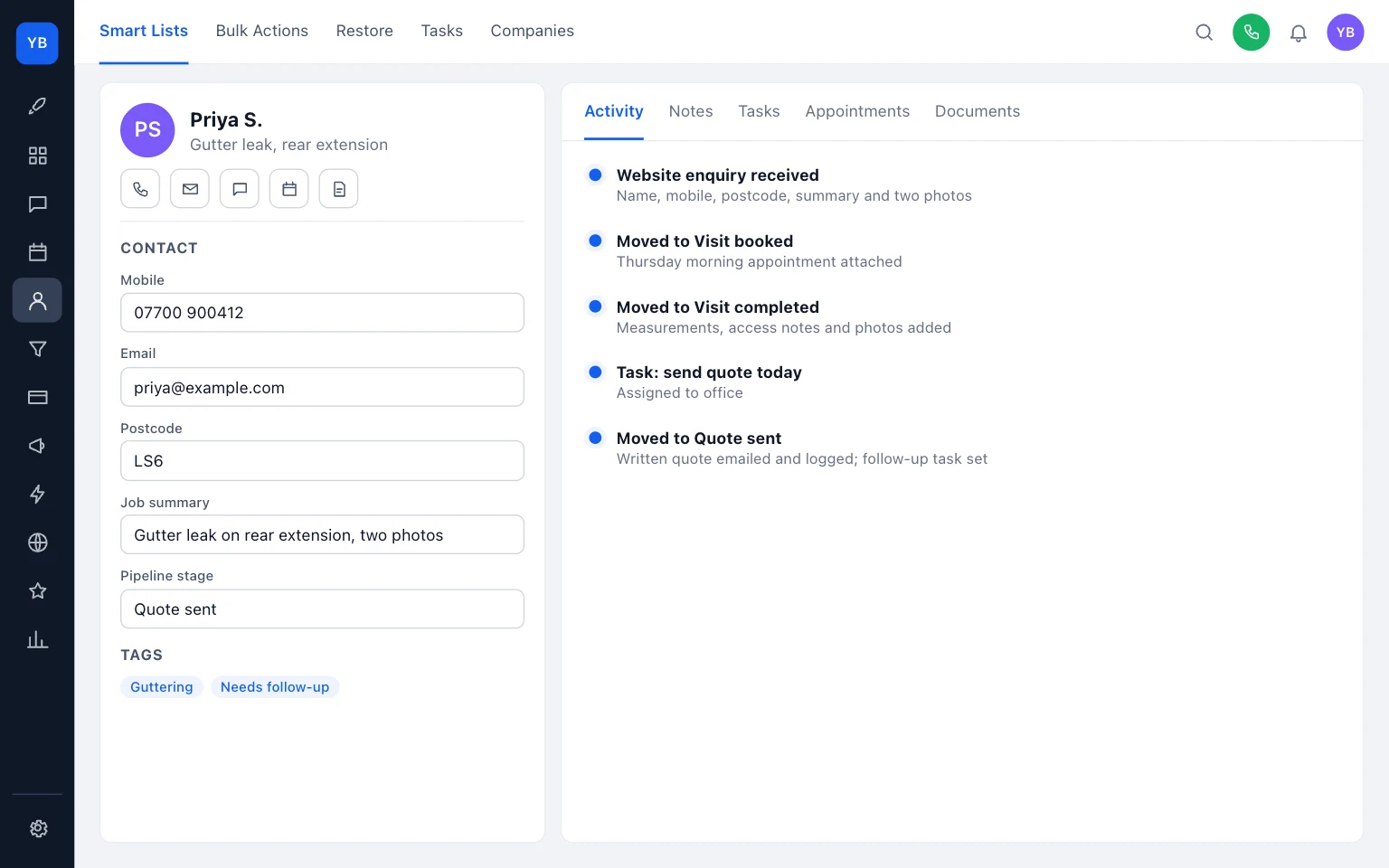
A website enquiry arrives for a rear extension gutter leak. The record contains the customer name, mobile number, postcode, a short summary and two photos. That is enough to enter the job into Enquiry received. The next action is a call to confirm access and whether a visit is needed.
On the call, the team decides a visit is needed. A Thursday morning appointment is booked and attached to the job. The job moves to Visit booked because there is now clear evidence: a real appointment, not just an intention.
The visit happens. Measurements, access notes and fresh photos are added to the job. A task is set to send the quote the same day. The job moves to Visit completed.
That afternoon, the written quote is emailed and logged on the record. A follow-up task is set for the next working day. Now, and only now, the job moves to Quote sent.
The customer replies accepting the quote and asking for the work to be carried out the following week. The team books the slot and notes the materials needed. The job moves to Agreed work.
After the work is finished, completion photos are saved and the invoice is sent. The job moves to Job complete.
Notice what did not happen. The quote was not treated as accepted just because it was sent. The job was not treated as paid just because it was complete.
Test it before you change the live board
Do not rename your live stages in a rush on Monday morning.
HighLevel allows opportunities to be added manually, by import, or by automation, so you do not need to automate from the start (Getting Started - Setup Pipelines and Opportunities). That makes a small, low-risk test possible.
Use one recent job and walk it through your draft stages. Ask:
- At which point did it first become a real enquiry?
- Was a visit genuinely booked, or only discussed?
- When was the quote actually sent?
- What counted as acceptance?
- What proved the job was complete?
If two people answer those questions differently, your stage definitions need tightening.
What you can do today
- List your current pipeline columns.
- Delete any column that is just a mood word: active, waiting, ongoing.
- Write one entry condition for each remaining stage.
- Write one exit condition for each stage.
- Decide the owner for every live stage.
- Decide the default next action for every live stage.
- Pick one recent job and move it through the draft table.
- Only then update your live board.
If you want a simple rule to remember, use this one: a stage should show a change in what your team knows and what your team does next.
That is all most small firms need from job pipeline stages for trades. Keep the board short, make entry evidence visible, and separate quote, booking and payment unless you have deliberately chosen to connect them.
If you want help setting up or simplifying your board, start with our job pipeline service or see /pricing/.
Keep building your enquiry process
See our guides for trades for the wider picture, explore job management pipeline with UKTL and check the current package and pricing.
Make it practical
Talk through your own setup.
If the website, local search and follow-up all need joining up, we can walk through how the UKTL setup works for your business.
Book a quick call Explore the relevant service →