
In practice Project notes
Roof-Tech website walkthrough: clear roofing enquiries
Roof-Tech’s website connects repair information, Newark, Lincoln and Grantham coverage, and survey enquiries. Its most useful lesson is to explain the customer’s next decision before asking them to get in touch.
Take this with you
At a glance
- Lead with the roofing problem and the places you cover.
- Explain what a survey helps the customer decide.
- Offer a short enquiry route alongside more detailed job questions.
A homeowner with a leaking roof has several questions before they contact anyone. Does this roofer cover my town? Do they handle repairs? What happens if the roof needs more work than expected?
The Roof-Tech website gives those questions a clear place in the page. Roof repairs lead the introduction, Newark, Lincoln and Grantham appear prominently, and the survey process explains how the customer can understand their options. This walkthrough looks at the published website checked on 19 October 2026; it demonstrates its content and enquiry design, without claiming an increase in leads, rankings or booked work.
Put the main job and location in the first view
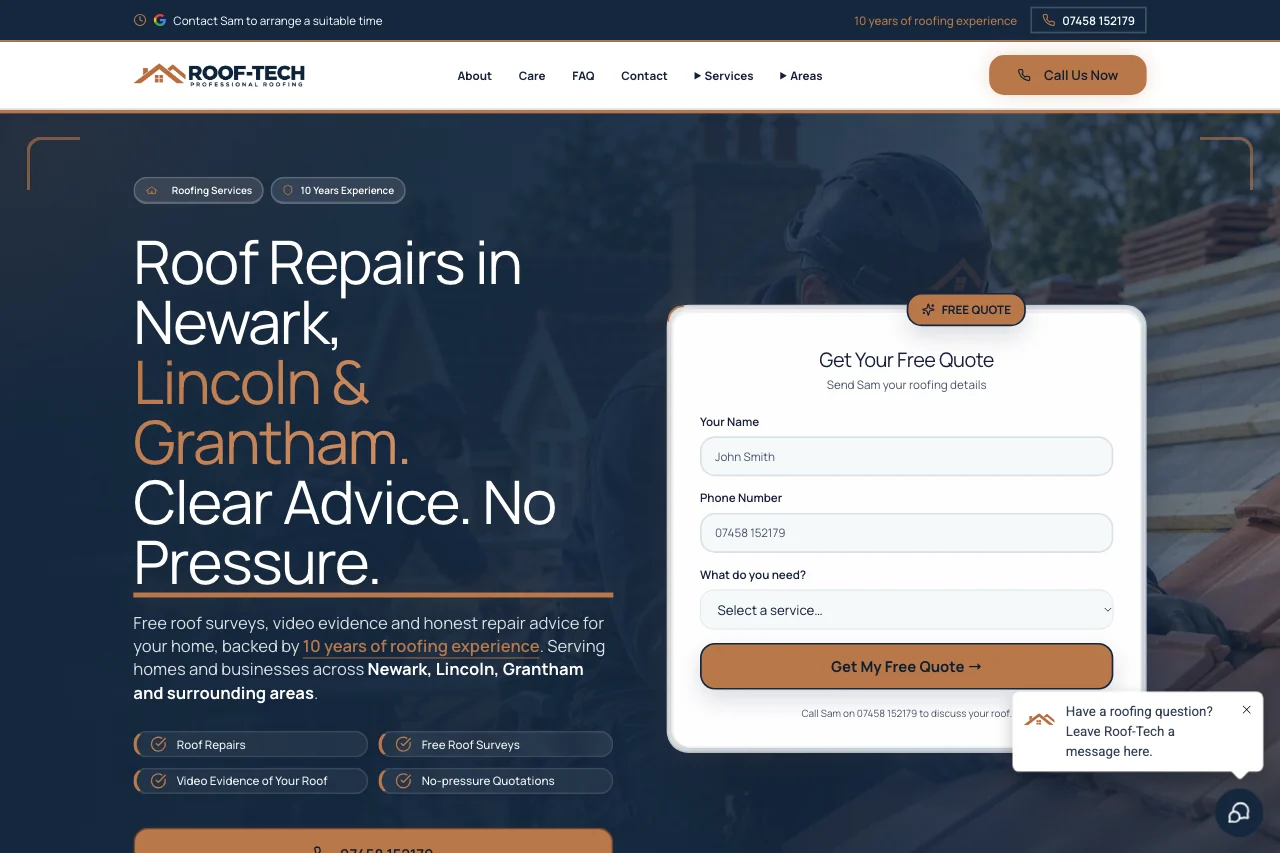
On desktop, the opening section has a dark navy overlay, large white lettering and warm copper accents. The Roof-Tech wordmark sits in a white header. A light quotation panel stands beside the introduction, so the visitor can read about the business and find an enquiry route in the same view.
The heading brings roof repairs and the three main towns together. It also introduces an approach based on explaining the problem before asking the homeowner to decide. That gives the opening section a specific purpose: help someone recognise whether they have reached a relevant business.
For your own website, try reading only the first heading and the nearest button. They should explain the work you want enquiries about, where you do it and what the visitor can do next. A large photograph cannot carry those details on its own.
Keep navigation useful for someone who knows little about roofing
The header includes About, Care, FAQ and Contact, with Services and Areas menus and a prominent call button. Those labels give visitors different ways to approach the same decision. Someone who already knows they need guttering can look for the service; someone checking coverage can start with the area.
Roof-Tech’s service list separates repairs, replacements, new roofs, flat roofing and pitched roofing. It also gives roof tiling, slating, leadwork, guttering, fascias and soffits, and maintenance their own routes. The roof repair page goes beyond a short service label: it discusses the source of leaks, the information to provide and the assessment process.
The practical lesson is to organise services around recognisable customer needs. Give related work a route forward, too. A visitor reading about a leak may need to understand leadwork or tile repairs before they can describe the problem confidently. Google’s SEO Starter Guide recommends clear organisation and descriptive links that help readers understand the destination.
Explain the decision that follows an enquiry
One of the most distinctive sections is the explanation of Sam’s survey process. The site describes a roof survey, video evidence of the condition, a discussion about repair or replacement, and the customer deciding how to proceed. The roof repair page repeats that sequence in more detail.
This is useful information to put between the service description and the contact request. The homeowner can see what the proposed conversation is about. They are being asked to discuss a property and an assessment, rather than choose a roofing specification from a website.
Apply the same idea to your trade. A bathroom fitter might explain the site visit, measurements and quotation. An electrician might explain which details help scope an inspection. Describe the process you actually follow, including when the customer receives the information needed to make a decision.
Give imagery a clear job
Roof-Tech uses large roofing images, including separate pictures for service cards. The opening photograph sits behind the dark overlay; lower down, images help distinguish repairs, replacement and other roofing categories. White content panels and copper details carry the explanations and links.
There is a useful distinction to preserve here. The homepage’s opening image is labelled as illustrative, and its roofing cards link to information about types of work. We are describing website imagery, rather than presenting those cards as independently verified completed customer projects.
For a roofer building a work gallery, add the details an image cannot explain: what the customer reported, what you found, which work was agreed and what the photograph shows. Use photographs you have permission to publish. If a picture is illustrative, describe it that way rather than giving it an invented customer or location.
Make local coverage easy to check
The areas page offers routes for Newark, Lincoln and Grantham. The homepage says Roof-Tech is based in Newark and asks customers to confirm nearby coverage by postcode. That is more useful for an uncertain visitor than an unqualified promise to cover everywhere.
The transferable point is to make service boundaries practical. Name the places you regularly serve, then explain how someone just outside them can check. A postcode is useful information for that conversation. Listing a town on a website does not establish a Google Maps position; our Google Maps guide for trades explains that separate part of being found locally.
Match the enquiry form to the visitor’s level of detail
The homepage starts with three simple questions: name, phone number and service required. The dedicated quotation page uses six stages covering property, roof material, scope, service, timing and contact details. It includes options for people who are unsure about their roof or the work needed.
That distinction makes sense for roofing. A homeowner may only know that water is getting in; someone planning a replacement may have more information ready. Asking for an approximate scope, with an option to request advice, lets the conversation start without requiring a diagnosis.
A visible phone route also gives customers a way to speak directly. Decide who will answer and what happens when they cannot; our missed calls guide covers that operational side. A form should support a real response process, and its presence alone cannot tell you whether someone received a reply.
Use this example to plan your own brief
Before commissioning a site, write down your main enquiry, realistic coverage and the steps between first contact and an agreed job. Then choose the service explanations and images that help a customer take that first step. Our website cost guide explains what to include when comparing the scope of a website.
For another approach to urgent and planned work, see the IQ Plumbing website walkthrough. You can also browse the guides for trades, explore our websites for trades service or check current UK Trade Leads pricing when you are ready to compare options.
Make it practical
Talk through your own setup.
If the website, local search and follow-up all need joining up, we can walk through how the UKTL setup works for your business.
Book a quick call Explore the relevant service →