
In practice Project notes
IQ Plumbing website walkthrough: urgent and planned jobs
IQ Plumbing’s website gives urgent callers a visible phone route while keeping plumbing, bathrooms, boilers and heating accessible through service pages and a staged quotation form. The lesson is to make each type of enquiry easy to recognise.
Take this with you
At a glance
- Keep your full range of work visible alongside emergency services.
- Use service pages to explain what customers should tell you.
- Ask about urgency, property and location before arranging the next step.
A plumbing website has to serve people in very different situations. One person needs help with a leak; another wants to discuss a bathroom; a third is trying to explain a boiler fault. Those visitors need different amounts of information before they get in touch.
The IQ Plumbing website presents plumbing and heating across South London, with a prominent emergency introduction and routes into planned work. This walkthrough examines the published pages checked on 19 October 2026; it demonstrates the website’s structure and enquiry choices, without claiming measured lead growth, search performance or completed bookings.
Make the first action easy to find
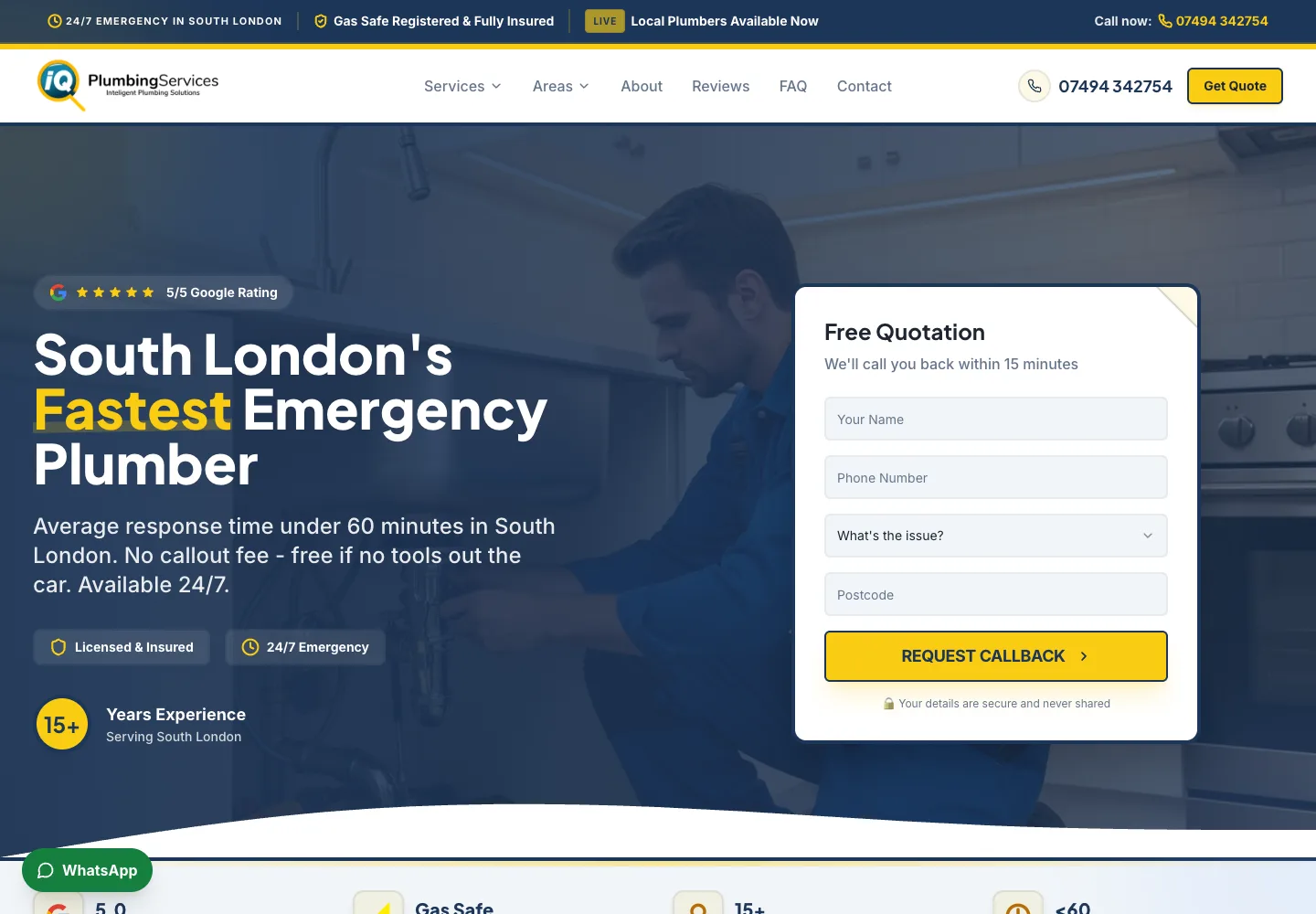
The desktop opening combines a navy background, yellow highlights and a white callback panel. A yellow quotation button and phone number sit in the header. The photograph behind the introduction shows a plumbing setting, while the overlay keeps the text visually separate from it.
The callback panel asks for a name, phone number, issue and postcode. That makes the intended action understandable without sending the visitor to a separate contact page. The header also offers Services, Areas, About, Reviews, FAQ and Contact, giving people who want to research the business a way to continue.
For your own trade website, decide which action deserves this prominence. If most customers need a conversation, make the phone number easy to identify and use. If the job normally starts with a description, give the form a clear heading and ask questions that help you respond.
Keep planned work visible beside the emergency route
The services section covers more than urgent repairs. Visitors can explore bathrooms, boilers, central heating, drains, leak detection, pipes, taps and showers, with a separate route for gas engineering and safety information.
This breadth matters when planning a plumbing website. A strong emergency introduction should still leave room for the other jobs you want customers to ask about. Someone considering a bathroom has different questions from someone with a burst pipe, even though they may contact the same business.
Write a short description for each substantial service and give it enough detail to stand alone. Explain the types of problem or project involved, what information helps you assess it and how the customer can discuss the next step. Avoid making every page a repeated general introduction with a different service name.
Help the customer describe a boiler problem
IQ Plumbing’s boiler services page separates repair, servicing and replacement. The repair section asks customers to have their postcode, boiler make and model, and details of the change or fault ready. It also links to related heating and landlord gas safety information.
That is a useful model for service copy because it prepares a conversation. A customer does not have to know which component has failed to explain that they have lost hot water or seen an error code. Clear questions let you collect the information needed to decide what to do next.
Where your work involves a registration, help customers verify it through the appropriate official route. The Health and Safety Executive explains how to check an engineer using the licence number from their Gas Safe ID card. A website badge is a reason to provide a checkable detail, rather than a substitute for that check.
Make a large service area understandable
The site groups its coverage into South East, South West, Croydon and Surrey, and Bromley and Kent. Visitors can follow individual local links, including the Lewisham page, rather than work through an undivided list of place names.
A useful coverage section answers a practical question: can I ask this business about a job at my property? Grouping nearby places helps someone scan, and asking for a postcode gives the business a more precise location when an enquiry arrives.
For your own site, check that every named area matches the work you are prepared to take on. Describe any travel limits clearly. Local pages and a Business Profile have different roles; our Google Maps guide for trades explains the profile side without treating website coverage as proof of a Maps ranking.
Use work imagery to explain the range
The service pages and homepage use plumbing, bathroom and heating images, with picture-led cards linking into more detail. The homepage also contains a section labelled Recent Projects with bathroom and boiler examples. Together, those elements show the range a visitor is being invited to explore.
We are describing the images and labels visible on the website; they do not independently establish who carried out a pictured job. For your own project gallery, use permission-cleared photographs and captions supported by your records. Explain what changed and why, including useful details such as the installation type or a layout constraint, without inventing a result.
Think about the question each image answers. A finished bathroom can help someone understand a style of work, while a carefully captioned installation photograph can explain a less visible service. Give each picture a purpose beyond filling the page.
Separate urgency from the type of job
The dedicated Get Quote page starts by asking what help is needed and how urgent it is. Service choices include emergency repairs, boilers, bathrooms, heating, leak detection and general plumbing. Urgency is a separate choice, so a heating enquiry can be urgent or planned.
The three-stage form then asks about the property and provides space for contact details and a description. That sequence is useful to consider when scoping your own enquiry journey. The job category says what the customer needs; timing says when they hope to discuss or arrange it; the postcode says where.
Keep an obvious call option for visitors who prefer to speak. Then make sure somebody owns the response to both routes. Our missed calls guide explains how to plan that follow-up. This review did not submit a customer enquiry or test receipt by the business.
Choose the parts that fit your business
Use IQ Plumbing as a prompt to review your own customer journeys. Can someone find a routine repair as easily as a larger installation? Does the service page help them describe the job? Are the area and next action clear before they reach the end?
The Roof-Tech website walkthrough explores a different approach, built around roofing assessments and repair decisions. For budgeting, read our website cost guide for trades. More examples and advice are in the guides hub, alongside our websites for trades service and current pricing.
Make it practical
Talk through your own setup.
If the website, local search and follow-up all need joining up, we can walk through how the UKTL setup works for your business.
Book a quick call Explore the relevant service →